Vector Toolchain
Vector Informatik provides one of the most widely used commercial toolchains to develop, configure, integrate, and test AUTOSAR Classic ECUs.

A typical AUTOSAR Classic workflow in the Vector ecosystem involves these major tools and delivered AUTOSAR SW implementation (MICROSAR):
| Tool | Main Role | Inputs | Outputs |
| PREEvision | System-level design | Architecture requirements | System Description ARXML |
| DaVinci Developer | SWC and RTE configuration | System Description ARXML | RTE code, SWC skeletons |
| DaVinci Configurator Pro | ECU & BSW integration | ECU Extract ARXML | Configured BSW code |
| vVIRTUALtarget | Create virtual ECU | Generated code, ARXML, MICROSAR | V-ECU executable |
| MICROSAR | AUTOSAR runtime software | Config data | BSW modules |
| CANoe / CANape | Test and validation | ARXML, A2L, databases | Test results, measurements |

PREEvision — System Architecture & Network Design
- What it does:
- Model the entire E/E architecture (ECUs, signals, buses, communication matrices).
- Define SWCs (Software Components) and their interfaces.
- Configure communication (CAN, LIN, FlexRay, Ethernet).
- Generate System Description (ARXML) files for each ECU.
- Outputs:
- AUTOSAR system description ARXMLs (used by DaVinci tools).
- AUTOSAR system description ARXMLs (used by DaVinci tools).
DaVinci Developer — Application & RTE Configuration
- Purpose:
Used mainly by software developers who define and connect AUTOSAR Application Software Components (SWCs).
- Main tasks:
- Import system description from PREEvision.
- Develop/modify SWCs and define ports, runnables, events.
- Configure data mapping between SWCs and RTE.
- Generate RTE (Runtime Environment) code and header files.
- Outputs:
- RTE source code.
- SWC code skeletons.
- ECU extract ARXML (for DaVinci Configurator Pro).
DaVinci Configurator Pro — ECU-Level Integration & BSW Configuration
- Purpose:
Used by integration engineers to configure and integrate the AUTOSAR Basic Software (BSW) modules and the OS.
- Main tasks:
- Import ECU Extract ARXML from DaVinci Developer.
- Configure:
- OS (OSEK/AUTOSAR OS tasks, events)
- Communication stacks (Com, CanIf, PduR, etc.)
- Diagnostic modules (Dcm, Dem)
- Memory (NvM, Fee, Ea)
- IO and MCAL configuration.
- Generate configuration code for MICROSAR BSW.
- Outputs:
- Configured BSW source code (MICROSAR).
- Complete ECU-level ARXML.
- Code ready for compilation.
vVIRTUALtarget — Virtual ECU Generation & PC Simulation
- Purpose:
Used to create and run virtual ECUs (V-ECUs) on a PC, enabling early testing without real hardware.
- Main tasks:
- Import configuration and generated code (from DaVinci tools).
- Combine SWCs + RTE + BSW (MICROSAR) into a PC-executable V-ECU.
- Optionally integrate with CANoe for network simulation.
- Support Software-in-the-Loop (SiL) testing and debugging.
- Inputs:
- ARXMLs and generated code from DaVinci Developer/Configurator.
- MICROSAR BSW modules.
- Outputs:
- Virtual ECU executable (V-ECU).
- CANoe configuration interface.
MICROSAR — AUTOSAR Runtime Software
- What it is:
Vector’s AUTOSAR Basic Software (BSW) implementation, providing all standard services and communication layers.
- Includes:
- MICROSAR OS, RTE, COM, PduR, Dcm, NvM, IO, and more.
- What happens here:
- DaVinci Configurator adapts MICROSAR modules to your specific ECU hardware or virtual target (vVIRTUALtarget).
- DaVinci Configurator adapts MICROSAR modules to your specific ECU hardware or virtual target (vVIRTUALtarget).
CANoe / CANape — Simulation, Testing & Calibration
- Purpose:
Used for system simulation, network testing, and calibration.
- Main tasks:
- Import ARXML, V-ECU, or real ECU descriptions.
- Simulate bus communication (CAN, LIN, FlexRay, Ethernet).
- Perform SiL/HIL testing and CAPL-based automation.
- CANape connects for measurement and parameter tuning (via XCP/CCP protocols).
- Integration:
- Import the ARXML and database files to simulate communication.
- Test RTE signals and BSW behavior.
- Run virtual ECUs from vVIRTUALtarget inside CANoe.
- Later, switch to physical ECUs with no software changes.
ETAS Toolchain
The ETAS AUTOSAR Classic Platform toolchain supports development of ECUs based on the AUTOSAR standard — covering modeling, configuration, integration, code generation, and testing (both virtual and on-target).
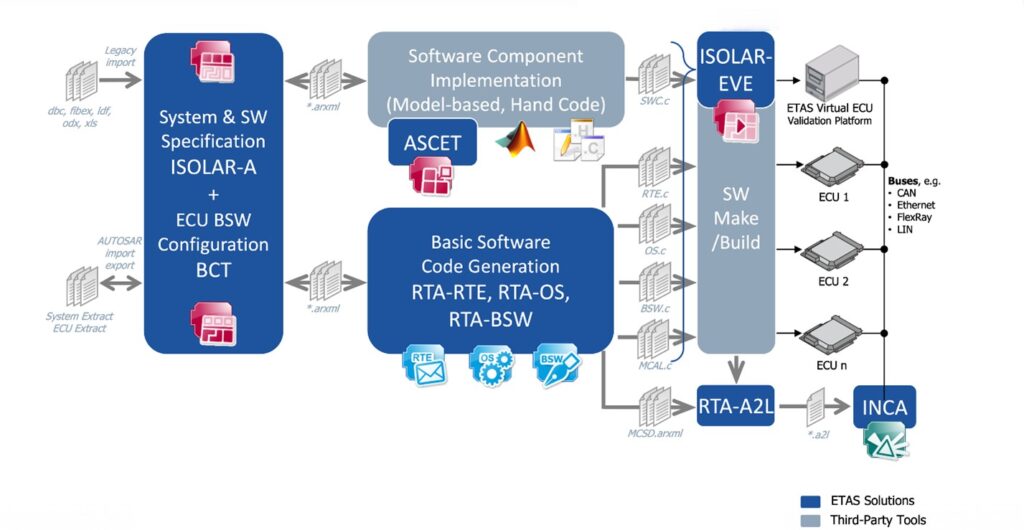
| Tool | Main Role | Inputs | Outputs |
| PREEvision | System-level architecture | System requirements | System Description ARXML |
| ISOLAR-A | SWC design & RTE config | System ARXML | RTE, SWC skeletons |
| ISOLAR-B | ECU & BSW integration | ECU Extract ARXML | Configured BSW code |
| RTA-BSW / RTA-OS | AUTOSAR runtime software | Config data | BSW + OS modules |
| VEOS | Virtual ECU simulation | Generated code, ARXML | V-ECU executable |
| INCA | Measurement & calibration | ECU or V-ECU | Calibration data |
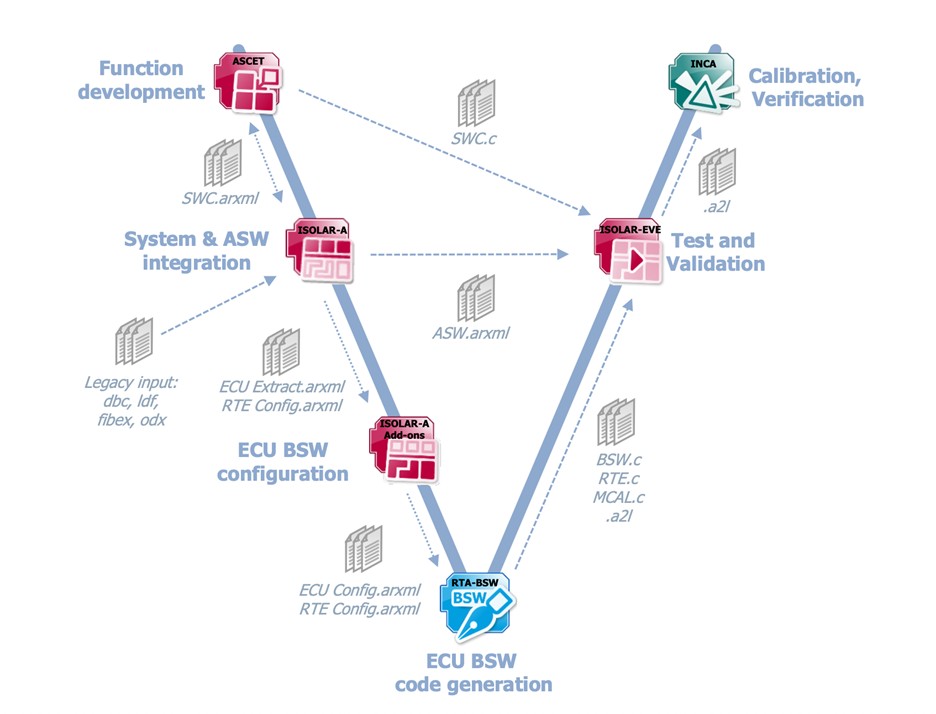
PREEvision (or equivalent) — System & Architecture Design
Note: ETAS often uses PREEvision for system-level design — PREEvision is actually a joint Vector–ETAS product. So the same tool is used at the top level.
- What it does:
- Model the full E/E architecture (ECUs, signals, buses, SWCs).
- Define SWCs, ports, and communication interfaces.
- Generate System Description ARXML for each ECU.
- Outputs:
- AUTOSAR System Description ARXMLs — input for ISOLAR-A.
- AUTOSAR System Description ARXMLs — input for ISOLAR-A.
ISOLAR-A — SWC Modeling & RTE Configuration
- Purpose:
Used by application software developers to create and configure AUTOSAR Application Software Components (SWCs).
- Main tasks:
- Import system description ARXML from PREEvision.
- Model or edit SWCs (runnables, events, ports, interfaces).
- Configure connections between SWCs.
- Generate RTE (Runtime Environment) and SWC skeletons.
- Perform consistency checks and data mapping.
- Outputs:
- SWC implementation templates.
- RTE configuration and source code.
- ECU Extract ARXML for ISOLAR-B.
ISOLAR-B — ECU Configuration & BSW Integration
- Purpose:
Used by integration engineers to configure and integrate the AUTOSAR Basic Software (BSW) stack and the OS for a specific ECU.
- Main tasks:
- Import ECU Extract ARXML from ISOLAR-A.
- Configure:
- BSW modules (Com, Dcm, EcuM, NvM, PduR, etc.)
- OS tasks and events
- Diagnostic, communication, and memory services
- Hardware abstraction and MCAL mappings
- Integrate the RTA-BSW and RTA-OS stacks.
- Outputs:
- Configured BSW source/config files.
- Complete ECU-level ARXML.
- Project ready for code generation and build.
RTA-BSW & RTA-OS — AUTOSAR Basic Software & Operating System
- What it is:
ETAS RTA (Real-Time Applications) is the AUTOSAR-compliant runtime suite:- RTA-BSW: ETAS’s AUTOSAR Basic Software implementation.
- RTA-OS: Highly efficient AUTOSAR OS (certified for safety up to ASIL-D).
- What they do:
- Provide AUTOSAR standard services: communication, diagnostics, memory, IO, etc.
- Ensure real-time performance and deterministic task scheduling.
- Integration:
ISOLAR-B configures these modules, and code is generated automatically for compilation or virtualization. - Outputs:
- Source and header files for BSW and OS.
- Build-ready AUTOSAR software stack.
VEOS — Virtual ECU Simulation (SiL)
- Purpose:
ETAS VEOS provides a virtual execution environment for AUTOSAR ECUs, allowing you to test your ECU software on a PC without real hardware. - Main tasks:
- Import the same ARXMLs and generated code from ISOLAR-A/B.
- Build a Virtual ECU (V-ECU) identical in configuration to the real ECU.
- Execute the ECU software (SWCs + RTE + BSW + OS) on the PC.
- Integrate multiple virtual ECUs for system-level simulation.
- Integration:
- Connects with INCA (for measurement and calibration) and LABCAR-OPERATOR (for HIL).
- Enables Software-in-the-Loop (SiL) testing and validation.
- Outputs:
- V-ECU executables and simulation configuration.
- V-ECU executables and simulation configuration.
INCA — Measurement, Calibration & Testing
- Purpose:
ETAS INCA is used for measurement, calibration, and diagnostics on real or virtual ECUs. - Main tasks:
- Communicate with ECUs via XCP/CCP or FETK interfaces.
- Measure signals and parameters in real time.
- Adjust calibration parameters and store calibration data (A2L/HEX).
- Integrate with VEOS for virtual calibration.
- Integration:
- Works seamlessly with both VEOS (V-ECU) and physical ECUs.
- Can also be connected to LABCAR for HIL environments.
Conclusion
The combination of Vector and ETAS toolchains provides a complete and reliable ecosystem for AUTOSAR Classic development — from system design and configuration to integration, testing, and validation. Each toolchain offers strengths that suit different engineering needs, but both enable teams to build scalable, compliant, and production-ready automotive software.
As the complexity of mobility systems continues to grow, choosing the right tooling environment becomes essential for development efficiency, safety alignment, and long-term maintainability. Understanding how these toolchains complement the AUTOSAR workflow empowers engineering teams to deliver high-quality software with confidence.